# Adding network to Metamask
### Adding Network via Browser Extension
1. Click on the **network selector button**. This will display a list of networks that you've added already.
2. Click '**Add network**':
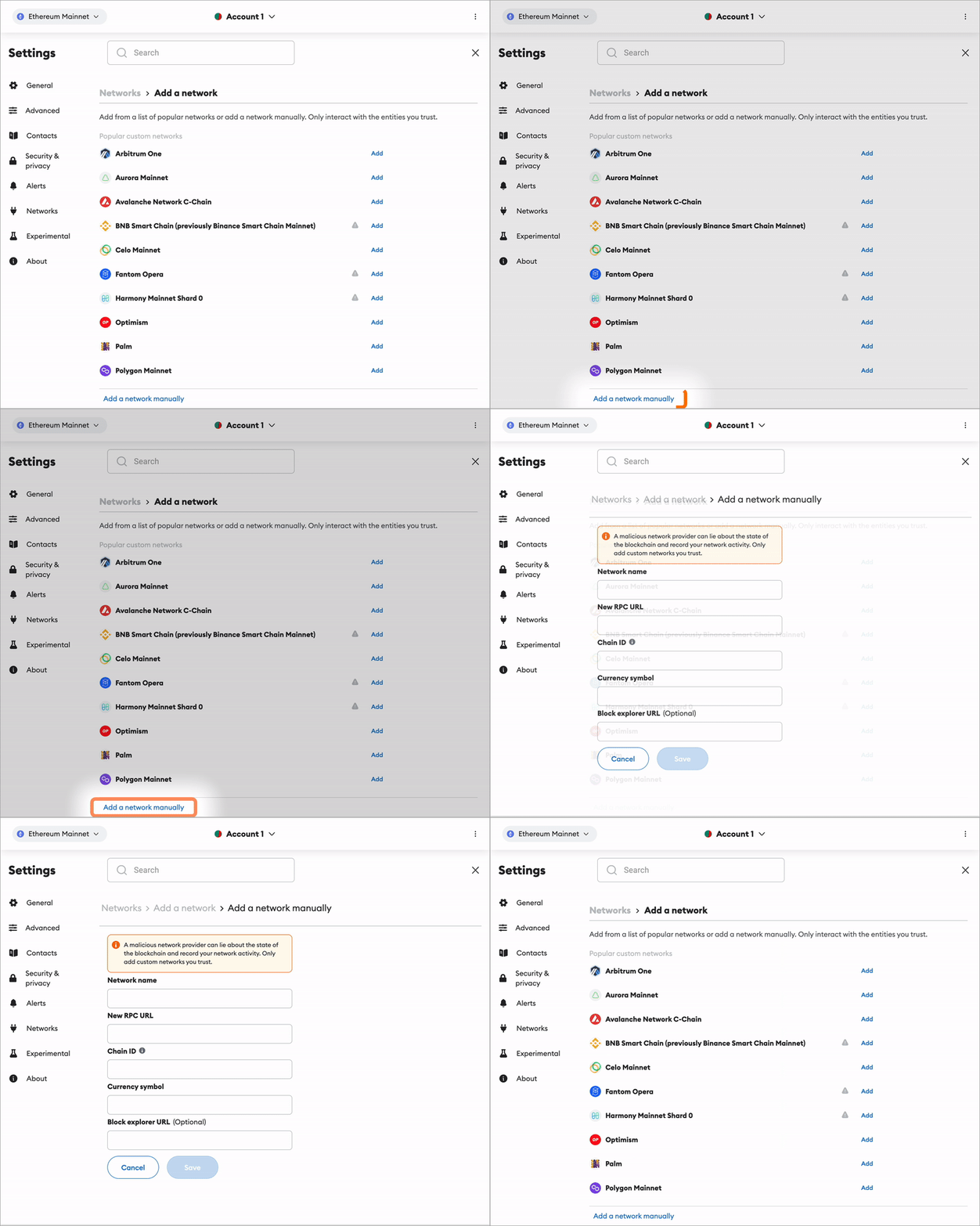
3. MetaMask will open in a new tab in fullscreen mode. From here, find and the 'Add network manually' button at the bottom of the network list.
4. Enter the following details and click '**Save**'
* **Ancient8 Testnet**
* **Network Name**: Ancient8 Testnet
* **New RPC URL:** [https://rpcv2-testnet.ancient8.gg/](https://rpcv2-testnet.ancient8.gg/)
* **Chain ID**: 28122024
* **Currency Symbol**: ETH
* **Block explorer URL (Optional):** [https://scanv2-testnet.ancient8.gg/](https://scanv2-testnet.ancient8.gg/)
* **Ancient8 Mainnet**
* **Network Name**: Ancient8 Mainnet
* **New RPC URL:** [https://rpc.ancient8.gg](https://rpc.ancient8.gg/)
* **Chain ID**: 888888888
* **Currency Symbol**: ETH
* **Block explorer URL (Optional):** [https://scan.ancient8.gg](https://scan.ancient8.gg/)